A customer writes “the shop is slow”.
In a minute you will know what did it.
PHPRay records every PHP request your store serves: response time, database queries, calls out to payment and shipping APIs, PHP errors. You open a slow request from an hour ago and see which plugin ate it — instead of disabling plugins one by one and waiting for the problem to happen again.
The report is a real result from a working shop with the site name removed. Nothing to install, no account, no address to hand over.
This is not a slide. It is the whole answer for a real WooCommerce shop — 39,995 requests over one week:
- urgent Requests are failing.
1,089 responses returned 5xx. The evidence includes
HTTP 500 — /shop/andHTTP 503 — /checkout/. Each one is a customer who saw an error page instead of the cart. - worth a look The queries that cost the most.
Autoload from
wp_options— 3.6 s in total across the window. Not the slowest single query; the most expensive in aggregate, because it runs on every request. - good to know Where the time goes, plugin by plugin. wordfence 97 ms per request, woocommerce 82 ms, elementor 81 ms, the storefront theme 42 ms. Health score 63/100, average 435 ms, slowest 5% above 555 ms.
The numbers come from a report the product generates itself, with the shop's name removed.
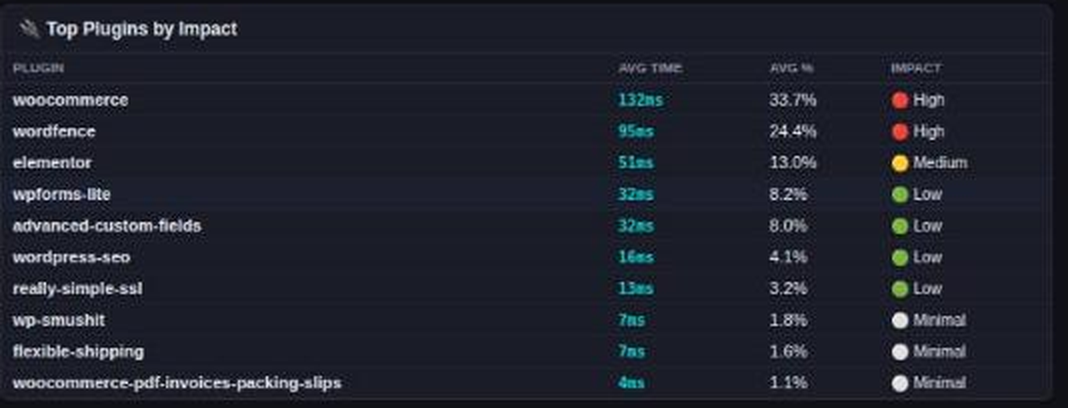
That is what the answer looks like: plugins sorted by the time they actually took from visitors. A screenshot from a running shop, not a mockup.
Every request, not a sample
Sampling tools keep statistics between samples. PHPRay writes one record per request, so the single failed checkout is still there when you look.
No customer data
SQL is stored as fingerprints with the values stripped:
WHERE email = ?. Request bodies, cookies and sessions are never touched.
Works on shared hosting
No daemon and no agent running as root. If you have your own php.ini —
and on most hosting you do — you can run it yourself.
Questions people actually ask
Why is my WooCommerce store slow only sometimes?
Because the cause is usually a specific request, not the whole site: one plugin on one page, a query that gets slower as a table grows, or an API call that answers in 80 ms all day and in 30 seconds at 03:14. Averages hide it. PHPRay records every request, so you open the slow one and read what happened inside it.
How do I find which plugin is slowing WordPress down?
PHPRay attributes time to plugins, themes and vendor packages on a sample of requests, and shows the result sorted by the time actually taken from visitors — for example woocommerce 132 ms and 33.7% of an average request. You do not have to disable plugins one by one.
Can I profile PHP on shared hosting without root?
Yes. The extension loads from your own php.ini, which most hosting lets you edit, and the WordPress plugin needs neither an extension nor a daemon — it is plain PHP 7.4+ that you upload through Plugins → Add New.
Does recording every request make the site slower?
Measured on a real WordPress page rendering in about 48 ms: 40.7 ms with recording on, against a 40.2 ms baseline — inside the noise. Per-function attribution costs about 4% on that page and 27% on a 48 ms micro-benchmark; we publish the method and the raw numbers.
Is any customer data sent anywhere?
SQL is stored as fingerprints with the values stripped, so a query becomes WHERE email = ?. Request bodies, cookies and sessions are never read. The local core stores everything on your own server; the Cloud console is optional and stored in the EU.
Check it on your own shop
Free plan: one site, 10,000 traces a day, 7 days of history, no card. The local core is open source and free without limits.
Create a free account Read the report first Download the WordPress pluginThe plugin needs no PHP extension, no daemon and no server access — plain PHP 7.4+, GPLv2. Upload it through Plugins → Add New → Upload Plugin and activate. It starts recording immediately; a console key is optional and only needed to send the data to PHPRay Cloud.
Download the WordPress plugin Download the WordPress pluginRunning this for clients, not just one shop? One list across every client site, priced per fleet — one list across 25–100 client sites, priced per fleet, no root needed.
Wondering whether your numbers are normal? Five production WooCommerce shops, measured over 24 hours — p95, share of 5xx and the time each plugin spends.
Wondering whether your numbers are normal? Five production WooCommerce shops, measured over 24 hours — p95, share of 5xx and the time each plugin spends.